
How to Create and Implement the llms.txt File in WordPress
In the new ecosystem of Artificial Intelligence (AI), web traffic no longer comes solely from humans clicking on search engines. Now, Extended Language Models (LLMs) like GPT-4, Claude, or Gemini “read” your site to feed their knowledge bases or answer queries in real time.
To ensure your content is correctly interpreted by these machines, a new standard has emerged: the llms.txt file. In this article, you will learn what it is and how to implement it step by step in WordPress.
What is the llms.txt file and why do you need it?
The llms.txt file is a plain text file originally proposed by Answer.ai. Its function is similar to robots.txt, but with a different objective: instead of dictating what to index, llms.txt provides a simplified and optimized version of your site so AI models can process it without the “noise” of the design (complex HTML, CSS, or ads).
Key benefits:
- Improved AI representation: It helps ChatGPT or Gemini cite your content more accurately.
- Token savings: By delivering clean text (markdown), models consume fewer resources and better understand your information hierarchy.
- Content control: You decide which sections of your website are prioritized for model training.
How to create an llms.txt file for WordPress
There are two main ways to do this: using plugins or manually.
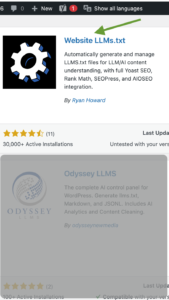
1. Plugin Llms.txt. As shown in the video, go to Plugins > Install New, search for LLMs.txt, and select the plugin from the image. Click “Install” and then “Activate.” Here, you need to specify what you want to be shown or indexed by AI. Select:
- Pages
- Posts (Blog)
- Meta information
- Meta descriptions
2. Using the Yoast SEO plugin (The easiest option if you have this plugin installed on your WordPress site)
If you use Yoast SEO (version 23.6 or higher), you already have native support for this feature. Yoast automatically generates a basic structure that includes your site name and short description.
How to activate it:
It’s usually active by default. You can verify this by visiting yoursite.com/llms.txt.
Customization:
Yoast allows the file to be populated with the content of your posts, automatically converting them to Markdown for AI bots.
To know more:
https://yoast.com/help/enable-llmstxt/
3. Manual Creation via FTP or File Manager
If you prefer complete control or don’t use specific plugins, you can create it yourself:
- Create a file called llms.txt on your computer using a text editor (Notepad or VS Code).
- Follow the standard Markdown structure: H1: Title of your site. Optional block: Brief description of what your website offers. Link list: A list of important URLs with brief descriptions.
- Upload the file to the root folder (public_html) of your WordPress installation via FTP.
Differences between robots.txt and llms.txt
They are often confused, but their purposes are complementary:
| Features | robots.txt | llms.txt |
| Audience | Search Engine Crawlers (Googlebot) | Language Models (LLMs) |
| Format | Exclusion-specific syntax | Markdown (human-readable text) |
| Objective | Control access and crawling | Facilitate content understanding |
Conclusion: Is it worth implementig?
Definitely yes. As generative search gains traction, being “AI-ready” is just as important as traditional SEO. Implementing an llms.txt file in WordPress is a simple step that positions your site at the forefront of technology and ensures your brand is correctly interpreted by the AI of the future.
Have you checked if your site has one? Simply add /llms.txt to the end of your domain in your browser.
If you have a business registered in Massachusetts, remember that you have one (1) free one-hour consultation session.
Learn more:
https://rankmath.com/kb/llms-txt/